Deployment lifecycle
Understand a deployment from detect and plan through execute, verify, and rollback.
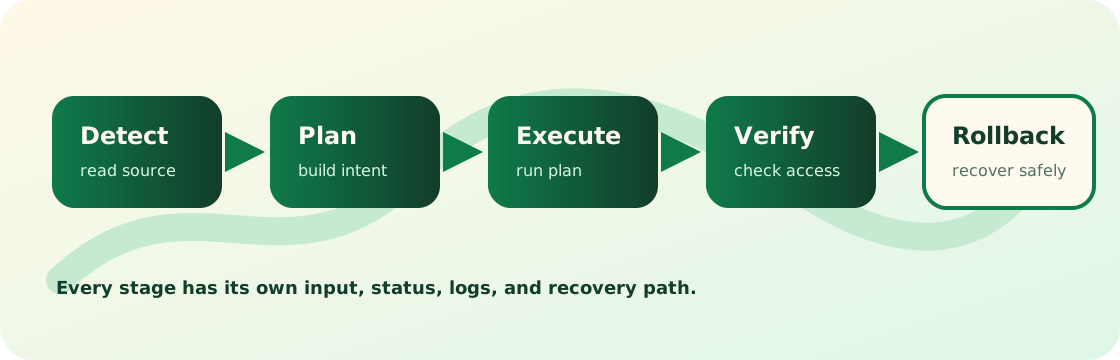
Appaloft models deployment as detect -> plan -> execute -> verify -> rollback.
This lifecycle explains user-visible deployment state. Users need to know which step failed, which input it used, and how to recover.
Detect reads source and configuration evidence to identify application type, build behavior, runtime entrypoint, and network exposure.
Common failures:
- Source cannot be read.
- Repository ref or base directory does not exist.
- App type cannot be detected and no runtime profile was supplied.
Plan turns source, runtime, health, and network configuration into an executable plan that explains what Appaloft will run.
The plan should summarize build, start, health check, and access routing decisions.
Plan preview runs only detect -> plan. It does not create a deployment attempt, write deployment events, or run build, run, verify, or proxy changes.
The preview shows detected framework/runtime evidence, selected planner, support tier, artifact kind, install/build/start/package commands, internal port, health check, access route summary, warnings, and unsupported reasons. Blocked previews include the phase, reason code, safe evidence, fix path, override path, and affected resource profile field when Appaloft can identify one. Fix resource source/runtime/network/health/access profiles first, then run the deployment.
Explicit planner/profile choices win over inference. Custom install/build/start commands, Dockerfile, Compose, prebuilt image, source base directory, internal port, and explicit health policy can repair unsupported, ambiguous, or missing evidence before you run deployments.create. Static deployments use the Appaloft static server on internal port 80; server-rendered or HTTP services need an internal port in the resource network profile.
Execute builds, uploads, starts, and routes the application in the selected target environment.
Execution failures often involve network, credentials, image pulls, build commands, server resources, or runtime backend behavior. Inspect logs and diagnostics before changing domains.
Compose updates run an image preflight before starting the candidate project: pull image-backed services, build buildable services, then run the replacement. A failed preflight starts no candidate containers. Compose public routing also requires an explicit targetServiceName, so Appaloft applies proxy labels and the edge network only to that service.
Verify checks process state, health policy, proxy routing, and access URLs.
Verify failure does not always mean the process failed to start. It may be health path, listener port, proxy routing, or access URL observation.
A successful docker compose up is not deployment success. Appaloft still checks that candidate containers exist and are running, that native Docker/Compose health has not failed, and that configured target-service HTTP and public-route checks pass. A failed candidate is cleaned up by deployment identity; it does not turn the previous successful runtime or route into a successful replacement.
Use appaloft deployments timeline <deploymentId> --follow --json when you need a structured replay or live timeline stream after the original deploy command has disconnected. The stream can return entry, heartbeat, gap, closed, or error envelopes; a gap means re-open observation or inspect deployment detail before choosing recovery.
Run appaloft deployments proof <deploymentId> --json or read GET /api/deployments/{deploymentId}/proof when automation needs to know whether the accepted source, artifact, and configuration became the workload observed now.
The result distinguishes verified, partially-verified, unverified, stale, and failed. It compares safe source/artifact/configuration fingerprints with resolved runtime identity, workload generation, health, access-route ownership, and recovery evidence. Missing adapter evidence is reported as unavailable and never counts as verified. A healthy old workload can therefore remain healthy while the attempted deployment proof fails or becomes stale.
Rollback is the recovery path after failure. It should not hide failure as success.
Start from the latest failed phase:
- detect failed: fix source or configuration.
- plan failed: fix resource profiles.
- execute failed: inspect server, credentials, build, and runtime logs.
- verify failed: inspect health, network, proxy, and access route.
- rollback failed: manual intervention is required; save diagnostics first.
Related pages: Deployment sources, Logs and health, and Safe recovery.
Deployment status response example:
{
  "id": "dep_123",
  "resourceId": "res_web",
  "status": "verifying",
  "currentPhase": "verify",
  "sourceSummary": {
    "kind": "git-repository",
    "gitRef": "main",
    "baseDirectory": "."
  },
  "recoveryHint": "Inspect health summary before retrying."
}